


Customer Communications Management (CCM) is all about the need to communicate personalized, accurate, timely documents to customers through a variety of digital and traditional channels. From insurance quotes sent on the spot to monthly bank statements to utility notices sent for compliance reasons, how your enterprise processes and creates documents affecting the efficiency of your operations and the customer experience.
Top enterprise CCM solutions, like Quadient Inspire and OpenText Exstream, provide powerful engines to meet a variety of communication needs. To create an optimal document generation workflow, however, a choice must be made between two basic execution models: interactive document processing and batch document processing.
By recognizing the differences between interactive and batch document generation, enterprise architects, IT leaders, and operations managers can create agile and scalable communication infrastructures that align with their businesses’ needs.
Case Study: Enterprise CCM Platform Migration
This case study details how Innovatix Technology Partners led a strategic, enterprise-scale migration to transform a complex, legacy Exstream environment into a modern, modular, and future-ready Quadient Inspire CCM platform.
What Is Interactive Document Processing?
Interactive document processing (often referred to as on-demand document generation or real-time document generation) occurs when a document is created, edited, or compiled instantly in response to a direct human action or event trigger.
In an interactive use case, a front-office user – be it a call center agent, claims adjuster, or wealth manager – engages with structured templates through a web browser or CRM interface. The CCM platform—such as Quadient Inspire Interactive or OpenText Exstream Empower—can be configured to be dynamic, sourced from data in back-end systems (e.g., Salesforce, core banking engines), while giving the user the choice to enter custom text, or select specific clauses, enter custom text, or review pre-filled fields.
Key Characteristics:
- Immediate Output: The documents are displayed in milliseconds or seconds, without the waiting time of the user.
- Controlled Human Intervention: Users have the ability to change specific ad hoc sections, but not regulated branding or legal disclaimers.
- Event-Driven Execution: Triggered directly through API calls, webforms or CRM integration.
What Is Batch Document Processing?
Batch document processing is an automated, scheduled execution method designed for high volume document processing without human intervention. The system accepts the data files (which may have thousands or millions of records) and processes them in bulk at a pre-designed layout engine, either in a maintenance window or during a time of day when fewer users are active.
High-throughput batch engines, such as OpenText Exstream and Quadient Inspire, are well-known for their ability to generate hundreds of thousands of personalized PDF, AFP stream or PostScript files per hour for printing, emailing or archiving for digital storage.
Key Characteristics:
- High Throughput & Efficiency: Optimized memory and CPU management for massive workloads.
- Zero User Intervention: Complete automation of data ingest from ERPs, mainframe databases or data lakes.
- Scheduled or Threshold-Driven: Executes on scheduled timetables (nightly, weekly, monthly) or when volume thresholds are met.
Interactive vs. Batch Processing: Key Differences
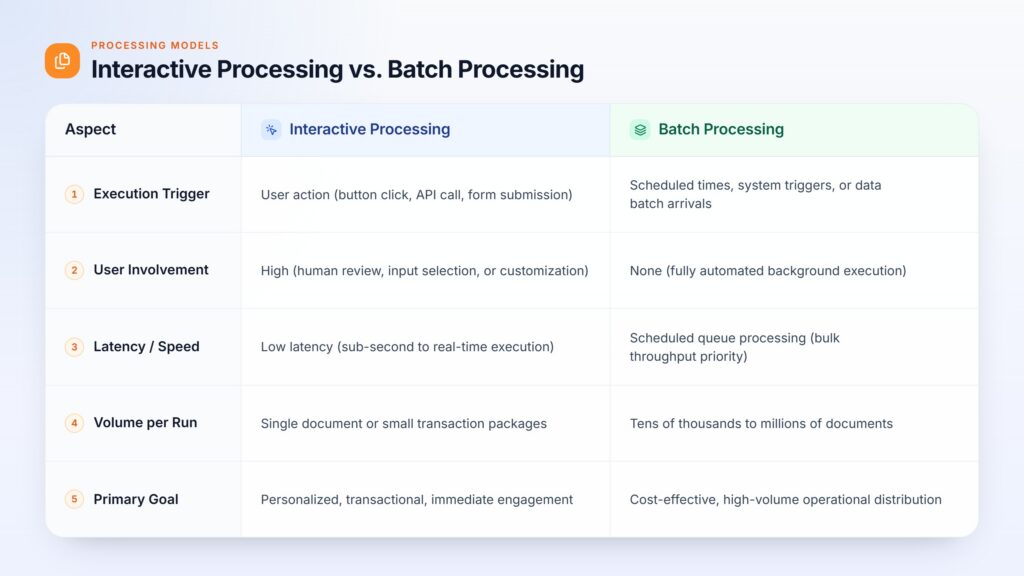
To understand interactive vs batch processing in enterprise document management, consider how each model handles trigger mechanisms, user involvement, execution speed, and resource utilization:
When Should You Use Interactive Document Generation?
Interactive processing is perfect when there’s a need for something more than one-size-fits-all automation. It is best to generate a document on-demand when a human judgment or negotiation is necessary, or when the document needs to be displayed soon.
Prominent Interactive Document Generation Use Cases:
- Insurance Policy Quoting & Underwriting: Agents make changes to rider options, adjust deductibles and create custom policy binders while on the phone with a client.
- Wealth Advisory & Loan Applications: Financial Advisors integrate customer portfolios, choose appropriate advisory letters, enter their own special comments, and create a customized investment proposal.
- Customer Support Escalations: Contact center staff construct bespoke resolution letters combining standardized template boilerplate with personalized explanations for complex dispute resolutions.
Through interactive features in the core system, enterprises enable front-line staff to engage with the system, and maintain the coherence of the corporate image and legal compliance through strict template lock-downs.
When Is Batch Document Generation a Better Choice?
If the data is already organized, verified and massive, batch processing will provide unparalleled efficiency and reduced infrastructure overhead per document.
Common Batch Document Generation Use Cases:
- Monthly Financial & Utility Billing Statements: Generating millions of credit card statements, mortgage summaries or utility bills at month-end.
- Annual Tax & Compliance Notices: Generating year-end W-2s, 1099s, or regulatory policy renewal notices across entire customer bases.
- Direct Marketing Campaigns: Issuing mass personalized promotions and using targeted cross-sell banners defined by customer segmentation data.
Batch engines maximize hardware utilization by deferring heavy compute tasks to non-peak hours, ensuring critical transactional systems remain fast and responsive during normal business operations.
How to Choose the Right Processing Method for Complex Workflows
Determining whether to deploy interactive or batch methods depends on analyzing four primary workflow vectors:
- Urgency & Channel: Does the customer expect immediate delivery via a portal/chat, or is overnight email/print delivery acceptable?
- Data Maturity: Is the required customer data 100% complete and verified in your database, or does a representative need to gather additional details ad-hoc?
- Volume & Compute Load: Are you generating 50 customized contracts a day, or 500,000 monthly invoices?
- Governance vs. Flexibility: Does the business unit require rigid automated output, or controlled flexibility to tailor content for VIP clients?
Implementation Excellence with Enterprise Partners
Implementing and set up hybrid processing architectures can be complex, such as with platforms like OpenText Exstream or Quadient Inspire. Special domain knowledge is needed for optimizing memory allocation, template modularity, API gateway latency, and database connectors.
By leveraging the skills built on the CCM and the ability of both Quadient and OpenText platforms, Innovatix Technology Partners provides organizations with skills and capabilities to modernise their document and customer communications infrastructure. Innovatix eliminates duplication and heavy maintenance efforts for enterprises by providing shared data models, templates, and business logic for both an interactive and batch environment, while providing agility, consistency, and scalability. The outcome is a more efficient and future-proof communications landscape that is ready to quickly adapt to changing business and customer needs.
Can Interactive and Batch Processing Work Together?
Absolutely. In fact, most enterprise level document processing workflows are based on a unified and hybrid approach.
Let’s take a look at an example of a mortgage loan origination process:
- Phase 1 (Interactive): A loan officer interactively drafts and customizes a preliminary disclosure agreement with the applicant, making real-time adjustments.
- Phase 2 (Interactive): The applicant e-signs the agreement via a web portal, triggering an on-demand generation of the executed closing packet.
- Phase 3 (Batch): At the end of the month, the core servicing engine batches all newly closed loans to generate standardized welcoming packets, payment books, and investor reporting feeds.
Quadient or OpenText platforms enable organizations to share underlying data models, templates, and business logic across both interactive and batch execution layers, organizations reduce maintenance overhead while providing exceptional agility.
Case Study: Enterprise CCM Platform Migration
This case study details how Innovatix Technology Partners led a strategic, enterprise-scale migration to transform a complex, legacy Exstream environment into a modern, modular, and future-ready Quadient Inspire CCM platform.
Frequently Asked Questions (FAQs)
- What is the difference between interactive and batch document processing?
Interactive document processing creates documents when they are requested by a user and batch processing processes a collection of document requests together. Interactive processing is more appropriate for interactive use scenarios where the application has an immediate user need while batch processing is more appropriate for high volume or scheduled use cases.
- When should businesses use interactive instead of batch document generation?
Interactive document generation is an option to consider for businesses where users must sign off on, select or input information prior to creating a document for a single person. Batch generation is typically a better fit for large numbers of documents that need to be generated from existing information, where there is little user interaction.
- Can interactive and batch document processing be used in the same workflow?
Yes. Interactive processing can be used for user-driven document requests and batch processing for high-volume or scheduled document creation, for complex workflows. Both can be used to accommodate both immediate response needs and large-scale processing.