


Passwords have outlived their security value. They require people to create, remember, and manage credentials across many services. This creates predictable security problems, including credential stuffing, phishing, password reuse, and account takeovers.
Passkeys, built on the Web Authentication (WebAuthn) standard and the FIDO2 ecosystem, move authentication away from shared secrets toward public-key cryptography. During registration, the user’s authenticator creates a unique asymmetric key pair: the private key remains protected by the authenticator, while the corresponding public key is registered with the application. Depending on the platform, the credential may be protected locally or synchronized securely across the user’s devices.
Core Concepts and Entities
- Passkey: A passwordless credential based on public-key cryptography. A private key is protected by the user’s authenticator, while the corresponding public key is registered with the application server. Passkeys may be device-bound or synchronized across a user’s devices, depending on the platform and credential type.
- WebAuthn (Web Authentication API): A W3C standard that enables web applications to interact with platform or roaming authenticators through the browser.
- Authenticator: A platform or hardware component that creates and protects credentials and performs cryptographic operations. Examples include Apple Touch ID/Face ID, Windows Hello, Android device authenticators, and hardware security keys such as YubiKeys.
- Relying Party (RP): The website or application that uses WebAuthn for authentication. The Relying Party maintains the user’s credential information, including the credential ID and public key, and verifies authentication assertions.
Step 1: User Registration Flow
Registration associates a newly created public-key credential with a user account while the corresponding private key remains protected by the user’s authenticator.
- Initiate Request: The user selects “Create a passkey” in the account settings or during account setup.
- Challenge Generation: The server generates a unique, unpredictable challenge and sends WebAuthn registration options to the browser, including the Relying Party ID and user information.
- Authenticator Prompt: The browser invokes the platform or roaming authenticator. The user may be asked to approve the operation using biometrics, a device PIN, or another local user-verification method.
- Key Generation: The authenticator creates a new asymmetric key pair scoped to the Relying Party.
- Credential Creation: The authenticator produces a credential response containing the information required by the server, including the credential’s public key and authentication data. Attestation information may also be included when requested and supported.
- Server Verification and Storage: The server verifies the response, including the challenge, origin, Relying Party information, and cryptographic data. If valid, it stores the credential ID and public key with the user’s account.
Step 2: User Authentication Flow
During authentication, the server verifies proof that the user controls the private key associated with the registered credential.
- Request Login Options: The user initiates passkey authentication, either by selecting a passkey or using an available passkey prompt.
- Issue a New Challenge: The server generates a new unpredictable challenge for that authentication attempt.
- Authenticator Interaction: The browser passes the challenge to the selected authenticator. The user approves the operation using biometrics, a PIN, or another supported local verification method.
- Assertion Signing: The authenticator uses the private key to sign the authentication data and server challenge, producing a WebAuthn assertion.
- Cryptographic Verification: The server verifies the assertion using the stored public key and validates the challenge, origin, Relying Party ID, and other required WebAuthn parameters. If validation succeeds, the server establishes the authenticated session.
Production Security and Edge Cases
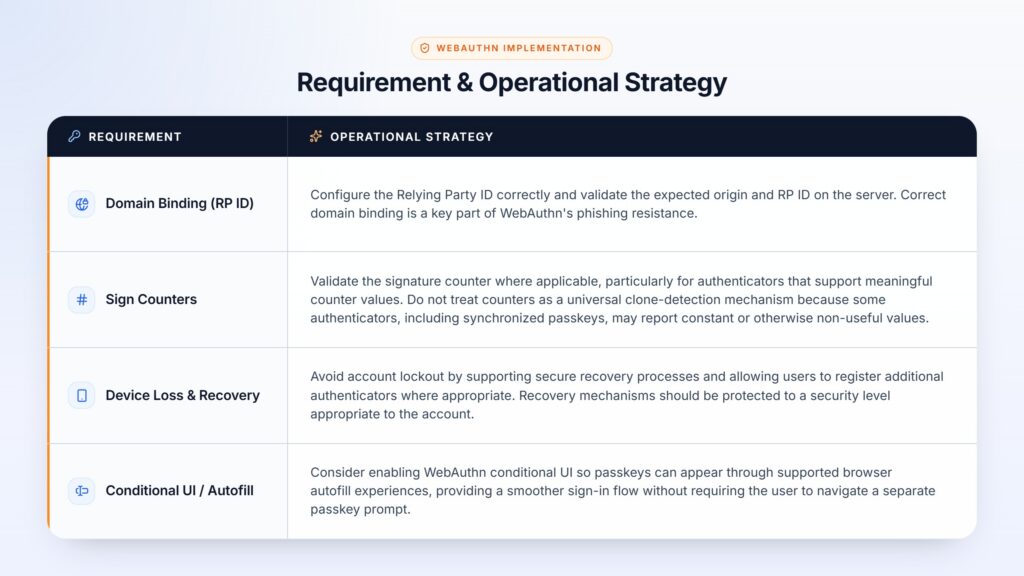
Moving passkeys into production requires careful handling of domain configuration, account recovery, device lifecycle, browser behavior, and authenticator differences.
The Verdict
Passkeys represent a significant shift from shared passwords to public-key cryptography. Because the private key is not sent to the application server and WebAuthn binds authentication to the intended website origin, passkeys provide strong protection against phishing and password-based credential theft. However, secure implementation still depends on correct server-side WebAuthn validation, secure account recovery, appropriate authenticator configuration, and careful handling of device and credential lifecycle events.
For organizations considering passkeys, the goal should not simply be to remove the password field. The implementation should cover registration, authentication, recovery, account management, monitoring, and the user experience across supported browsers and devices.
Editorial Review Notes
- The original draft incorrectly expanded W3C as ‘Web 3 Consortium’; it should be ‘World Wide Web Consortium.’
- The claim that passkeys are ‘completely resistant’ to phishing and credential leaks was softened. Passkeys are designed to be strongly phishing-resistant, but security still depends on correct implementation and account-recovery controls.
- The description of passkeys as purely ‘possession-based’ was refined because platform passkeys can involve local user verification such as biometrics or a PIN, and synchronized passkeys have different lifecycle characteristics.
- ‘PI’ was corrected to ‘PIN.’
- The registration and authentication descriptions were revised to use more accurate WebAuthn terminology, especially around assertions, verification, origin, and Relying Party ID.
- The signature-counter section was qualified because counter behavior varies by authenticator and is not a universal clone-detection mechanism.
- The statement about login taking ‘a few milliseconds’ was removed because the actual user-perceived time varies by device, browser, network, and implementation.
Whitepaper – Static, Server, or Hybrid: Choosing the Right Rendering Strategy for Modern Web Apps
This whitepaper provides engineering leaders with a clear framework to evaluate Static Site Generation (SSG), Server-Side Rendering (SSR), and Hybrid strategies so they can optimize performance, data freshness, and cloud costs in modern web applications.